
Table of Contents
- Getting the Boss Backend UID
- All Trading History (User‘s balance statement)
- Completed Orders
- Uncompleted Orders
- Trading Pairs Configuration
- Managing Operator Users
- Hedging
This backend is mainly to check the user’s trading history.
1. How to Get The User’s Boss Backend UID
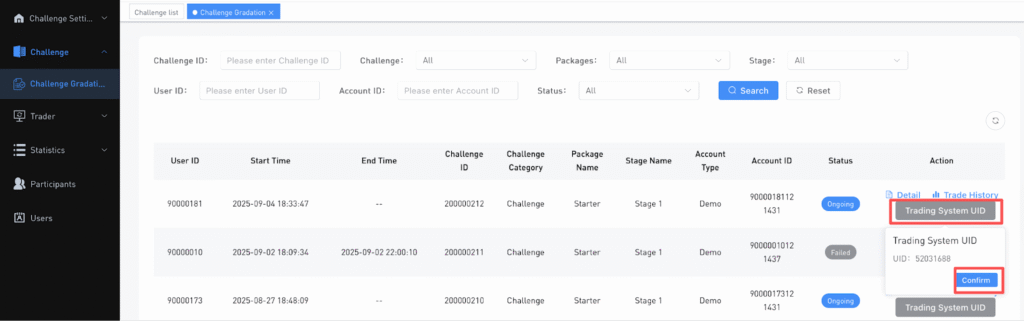
- Log in to the Traderboss backend, if the user is in the challenge stage, click on Challenge Gradation > Trading System UID and copy the UID.
Note: Please get the latest stage UID, as each stage has a different UID.
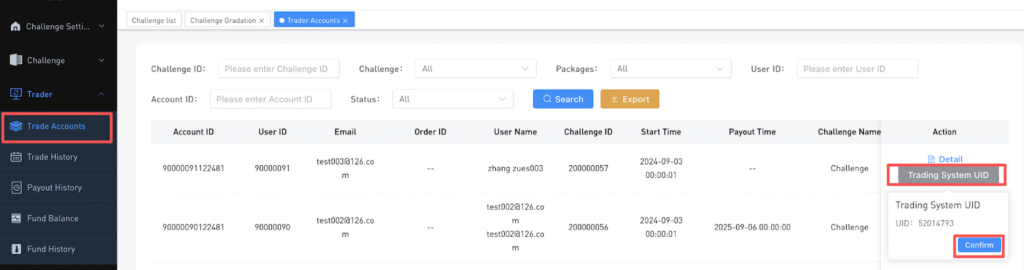
- If the user is in the live stage, click on Trader> Trade Accounts and copy their UID.
2. All Trading History
Here you can view all trading records as the user’s balance statement, including previous balance, current balance, funding fees, and remaining balance.
- Log in to the Boss backend > Order Futures > All Trading History.
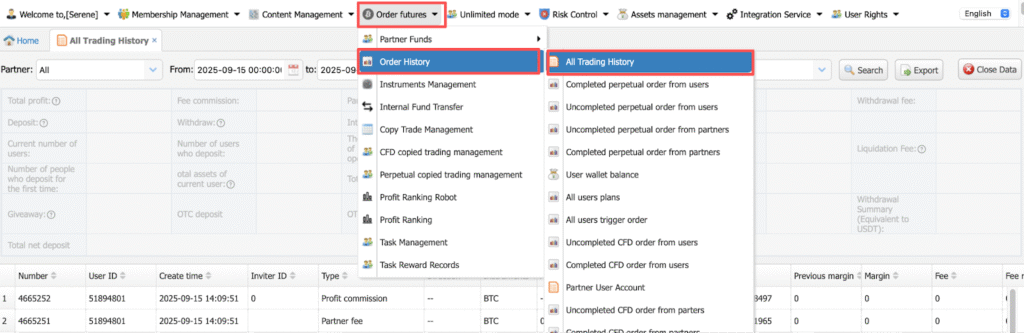
- Paste the UID and select the time filter. Click on the display data button to summarize the data.
